Exchange rate data in Microsoft Fabric
This is an example of working with exchange rate data. You can sign up for a free API key at exchangerate.io that gives you 100 free calls per month. Each call of the historical rates endpoint returns a day's worth of historical exchange rates. The response is a JSON document that looks like this:
{
    "success":true,
    "timestamp":1635379199,
    "historical":true,
    "base":"EUR",
    "date":"2021-10-27",
    "rates":{
        "GBP":0.844714,
        "USD":1.159978,
        "NOK":9.770237,
        "DKK":7.439175,
        "JPY":131.97892
    }
}
Scenario
The scenario is this. You have collected several years' worth of exchange rate data and, because there's one JSON file per day, you have over 1,000 files. The files are kept in a storage account. The task is to create an exchange rate dimension from this data.
Fabric
We will accomplish this task using Microsoft Fabric. A shortcut will be used to establish a link between the storage account and a Fabric lakehouse. Then the files will be combined and transformed into a suitable dimension table using pandas within a Python notebook.
Create a shortcut
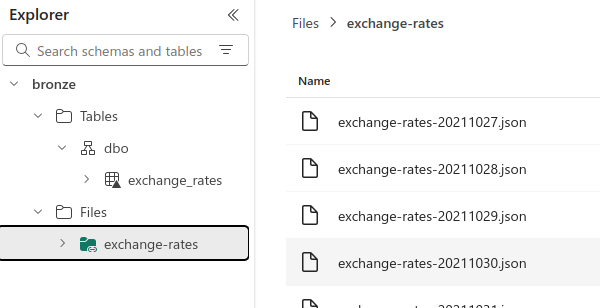
Create a shortcut from a lakehouse to the storage account containing the exchange rate files:
Create a Python notebook
Create a notebook and set it to the Python runtime. A Python notebook provides compute on a single node with two cores, which is ideal for transforming small datasets such as we are working with.
Add the code
Now for the transformations. Combining one thousand small (<1 KB) files is best done a single machine. Use notebookutils to get the list of paths.
files = notebookutils.fs.ls('/lakehouse/default/Files/exchange-rates')
Use pandas to combine the files:
import json

import pandas as pd


files = notebookutils.fs.ls('/lakehouse/default/Files/exchange-rates')

frames = []

for file in files:
    with open(file.path, 'r') as f:
        frames.append(pd.json_normalize(json.load(f)))

df = pd.concat(frames)
Add transformations
There are various transformations:
import json

import numpy as np
import pandas as pd


frames = []

files = notebookutils.fs.ls('/lakehouse/default/Files/exchange-rates')

for file in files:
    with open(file.path, 'r') as f:
        frames.append(pd.json_normalize(json.load(f)))

df = pd.concat(frames)

df.columns = [column.replace('rates.', '') for column in df.columns]

# df = df.drop(columns=['historical', 'success', 'timestamp'])

df['date'] = pd.to_datetime(df['date']).dt.date

df = (df
    .melt(
        id_vars = ['base', 'date'],
        value_vars = ['GBP', 'USD', 'NOK', 'DKK', 'JPY'],
        var_name = 'quote',
        value_name = 'rate'
    )
)

conditions = [
    df['quote'] == 'EUR',
    df['quote'] == 'GBP',
    df['quote'] == 'JPY',
    df['quote'] == 'USD',
    df['quote'] == 'NOK',
    df['quote'] == 'DKK'
]

dim_currency_ids = [5, 6, 8, 13, 9 ,4]

df['DimCurrencyId'] = np.select(conditions, dim_currency_ids, default=-1)

df['DimDateId'] = pd.to_numeric(pd.to_datetime(df['date']).dt.strftime('%Y%m%d'))

df = df[['DimDateId', 'DimCurrencyId', 'date', 'base', 'quote', 'rate']]
Write to Delta table
A helper function to return the lakehouse path:
def get_lh_path(lh_name:str = None):
    """Return the lakehouse path."""
    lh_list = notebookutils.lakehouse.list()
    if not lh_name:
        return f"lh_name to one of: {[lh.displayName for lh in lh_list]}"
    try:
        return [
            lh.properties['abfsPath']
            for lh in lh_list
            if lh.displayName == lh_name
            ][0]
    except IndexError:
        lhs = [lh.displayName for lh in lh_list]
        print(f"lh_name must be one of {lhs}")

bronze_path = get_lh_path('bronze')

table_path = f"{bronze_path}/Tables/dbo/dim_exchange_rate"
And finally write to a delta table:
from deltalake import write_deltalake
import pyarrow as pa


table = pa.Table.from_pandas(df)

write_deltalake(table_path, table, mode='overwrite')